Your screen,
analyzed by AI,
on your phone or PC.
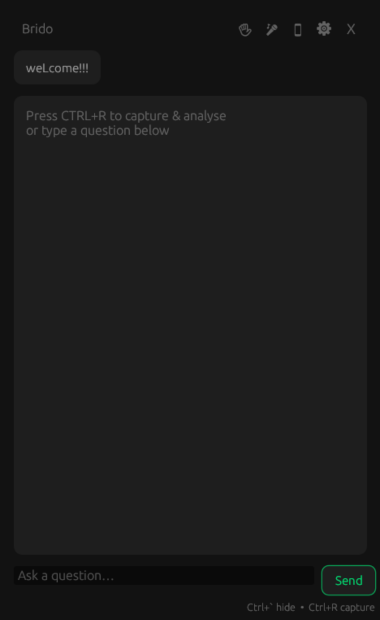
Analyze any problem on your screen instantly. Stream to your phone over local Wi-Fi or run directly on Windows with a stealth overlay. Tap or press hotkey to get instant AI analysis of coding questions, MCQs, or debugging sessions. Invisible to proctoring tools, with no tab-switch detection and no cloud relay.

Built for focused
problem solving
AI assistance one tap or hotkey away — without breaking your session or your focus.
Online Coding Tests
Stream the test to your phone or trigger the desktop overlay via hotkey. Get AI hints, approach suggestions, and edge-case breakdowns without touching the browser or switching tabs.
Technical Interviews
Keep the interview window in focus. The stealthy Windows overlay is excluded from screen share and Alt-Tab, providing real-time AI guidance directly on your PC screen or on your phone.
Exam & MCQ Practice
Run Brido alongside practice platforms. Use the Windows-only overlay or stream to your phone to analyze MCQs, logic puzzles, or complex diagrams in real time.
Two ways to run AI analysis
From setup to instant solutions in under two minutes.
Windows-Only Stealth Mode
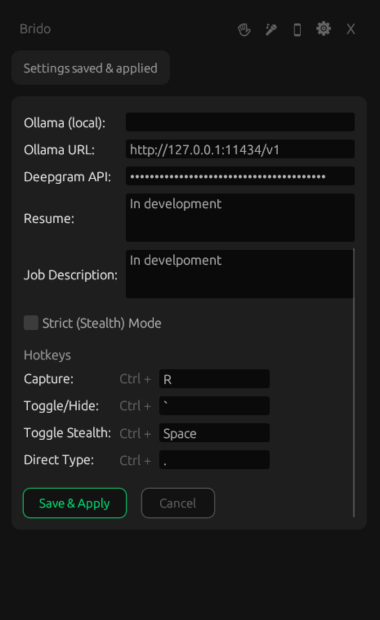
Launch the Rust app. Press Ctrl+Shift+Space anywhere. An invisible stealth
overlay captures the active screen area, runs AI analysis, and renders the result directly
on your PC screen.
Companion Phone Streaming
Launch the Rust app and open the Android companion app. Scan the QR code to stream your Windows screen. Tap Analyse on your phone for full separation of concerns.
Configure Providers
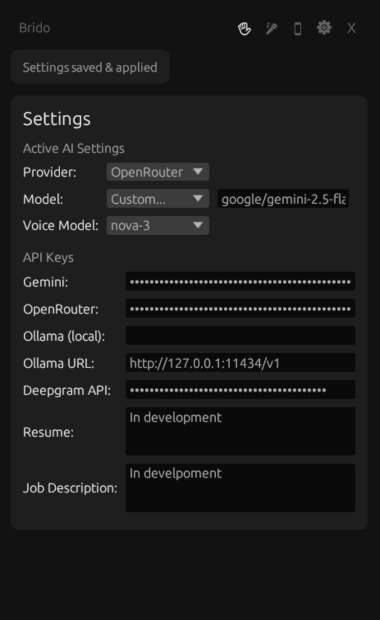
Input API keys for Gemini, OpenRouter, OpenAI, Anthropic, or run a local Ollama model. The system routes requests locally with no cloud relay or account required.
Flexible components,
local network
No cloud relay. No account. No subscription. Configure AI providers via the GUI or
.env.local.
Windows App / Server
- DXGI screen capture at 15 fps, resized to 720p, JPEG-encoded at quality 65, broadcast over WebSocket to all connected clients.
- egui desktop GUI with QR code, IP, and PIN display. Minimises to system tray; double-click tray icon to restore.
- Multi-provider AI with priority failover: OpenRouter → OpenAI → Anthropic → Gemini → Ollama. Model hint per request overrides priority.
- Hotkey overlay
Ctrl+Shift+Space: captures the screen and runs AI analysis without switching windows or lifting focus from the active app. - Tab-switch detection bypass: the overlay uses
WS_EX_NOACTIVATEsovisibilitychangeandblurevents used by proctoring sites never fire. - Stealth mode:
WDA_EXCLUDEFROMCAPTUREhides the overlay from OBS and screen-share;WS_EX_TOOLWINDOWremoves it from Alt-Tab. - TLS + PIN auth: self-signed cert via rcgen, fresh 6-digit PIN each restart, UUID session tokens stored in memory only.
- First-run setup prompt: opens automatically when no API key is configured. Supports OpenAI, Anthropic, Gemini, OpenRouter, and local Ollama.
Android App
- QR pairing via CameraX + ML Kit, or manual IP + PIN entry. Connects in seconds on the same Wi-Fi.
- Live stream viewer: receives binary JPEG frames over WSS and displays them in real time using Compose image composables.
- anAlyse button: takes the latest frame, compresses it with
adaptive quality presets (1440p → 1024p → 768p), and POSTs to
/api/analyse. - Retry logic: automatically downsizes and retries on 413, 429, 502, 503, 504, or generic 5xx errors before surfacing a failure.
- Terminal panel: scrollable output pane that renders the AI response, model used, and status lines alongside the stream viewer.
- Model selector: fetches available providers from
/api/modelsand passes a model hint with each analysis request. - Trust-all TLS: accepts the server's self-signed certificate on the local LAN without manual certificate installation.
- diScoNnect returns to the connection screen; session token is cleared and stream stops immediately.